
How to Send Bulk WhatsApp Messages Without Getting Banned
Complete guide with safe sending limits, delay settings & ban recovery tips
Sending bulk WhatsApp messages without getting banned is the biggest challenge for businesses using WhatsApp marketing in 2026.
WhatsApp has 3+ billion users worldwide, with India alone having 535+ million active users. The platform delivers an incredible 98% open rate compared to email's 20% — making it the most powerful marketing channel for businesses.
But here's the problem: WhatsApp banned 92.3 million accounts in India in 2025 alone for policy violations. One wrong move and your business number could be gone forever.
In this complete guide, you'll learn exactly how to send bulk WhatsApp messages safely, the right message limits, delay settings, and what to do if your account gets banned.
📋 Table of Contents
- Why WhatsApp Accounts Get Banned
- WhatsApp Official Guidelines You Must Know
- WhatsApp Message Limits (Daily & Hourly)
- 10 Tips to Send Bulk WhatsApp Without Ban
- Lion CRM Safe Bulk Messaging Features
- Step-by-Step: Send Bulk Messages Safely
- How to Recover Banned WhatsApp Account
- Frequently Asked Questions
📺 Watch: How to Use Bulk Message Feature in Lion CRM
This tutorial shows the basic bulk messaging feature with pause and delay settings in Lion CRM.
Why WhatsApp Accounts Get Banned?
Before learning how to send bulk WhatsApp safely, you need to understand what triggers WhatsApp's spam detection system.
WhatsApp uses AI-powered algorithms to detect suspicious messaging patterns. When your account shows bot-like behavior, it gets flagged automatically.
Top 10 Reasons for WhatsApp Account Ban
| # | Ban Reason | Risk Level |
|---|---|---|
| 1 | Sending messages to people without their consent | 🔴 Very High |
| 2 | Using modified apps (GB WhatsApp, FM WhatsApp, WhatsApp Plus) | 🔴 Very High |
| 3 | Sending identical messages to many contacts quickly | 🔴 Very High |
| 4 | Getting reported by multiple users (5-10 reports = review) | 🔴 Very High |
| 5 | Bulk messaging from a new number without warmup | 🟠 High |
| 6 | Adding people to groups without permission | 🟠 High |
| 7 | Very low response rate (sending 500 messages, getting 2-3 replies) | 🟠 High |
| 8 | Using automated messaging tools without proper delays | 🟠 High |
| 9 | Sending prohibited content (spam, illegal, adult) | 🔴 Very High |
| 10 | Forwarding same message to multiple groups rapidly | 🟠 High |
WhatsApp Official Guidelines You Must Know
According to WhatsApp's Terms of Service, users must not:
"Involve sending illegal or impermissible communications such as bulk messaging, auto-messaging, auto-dialing, and the like."
The WhatsApp Messaging Guidelines further state:
"Do not engage in adversarial behavior including using unofficial clients, bulk messaging, auto-messaging, or automation to harm WhatsApp or our users."
What Does This Mean for Businesses?
WhatsApp allows business communication but with strict rules:
- Opt-in Required: You can only message people who have given consent
- No Spam: Messages must be relevant and expected by recipients
- Quality Over Quantity: Focus on engagement, not just sending volume
- Use Official Tools: WhatsApp Business App or approved Business API solutions
The key insight: WhatsApp doesn't ban you for sending bulk messages — it bans you for sending unwanted messages or behaving like a bot.
WhatsApp Message Limits (Daily & Hourly)
Understanding WhatsApp's messaging limits helps you plan your bulk messaging strategy safely.
WhatsApp Business App Limits
| Feature | Limit |
|---|---|
| Broadcast List Size | 256 contacts maximum |
| Broadcast Requirement | Recipients must have your number saved |
| Safe Daily Messages (New Account) | 20-30 messages |
| Safe Daily Messages (Established Account) | 100-200 messages |
WhatsApp Business API Tier Limits
For businesses using WhatsApp Business API, messaging limits work in tiers:
| Tier | Daily Unique Conversations | Requirements |
|---|---|---|
| Unverified (New) | 250 | New accounts start here |
| Tier 1 | 1,000 | Verified business |
| Tier 2 | 10,000 | High-quality messages, 50%+ daily usage |
| Tier 3 | 100,000 | Sustained quality, no low ratings |
| Tier 4 (Unlimited) | Unlimited | High-quality verified enterprises |
Need WhatsApp Business API? We provide WhatsApp Business API solutions at whatsapp.lotsofcode.in — contact us for setup and pricing.
Recommended Safe Sending Limits
| Account Age | Daily Limit | Message Interval |
|---|---|---|
| Week 1 (New Number) | 40-50 messages | 60-120 seconds between messages |
| Week 2-4 | 100-150 messages | 30-60 seconds between messages |
| Month 2+ (Established) | 200-500 messages | 20-30 seconds minimum |
10 Tips to Send Bulk WhatsApp Without Getting Banned
Follow these proven strategies to send bulk WhatsApp messages safely and protect your business number.
1. Always Get Opt-In Consent First
This is the #1 rule for safe bulk WhatsApp messaging. Never message someone who hasn't agreed to receive your messages.
How to get consent:
- Add WhatsApp opt-in checkbox on your website forms
- Collect numbers at events with clear "WhatsApp updates" permission
- Ask existing customers: "Can we send you updates on WhatsApp?"
- Use "Click to WhatsApp" ads where users initiate contact
2. Validate Numbers Before Sending
Sending messages to invalid or disconnected numbers raises red flags with WhatsApp's system.
Why number validation matters:
- Invalid numbers = higher "not delivered" rate = spam signal
- Purchased contact lists often have 30-50% invalid numbers
- Clean lists improve delivery rate and reduce ban risk
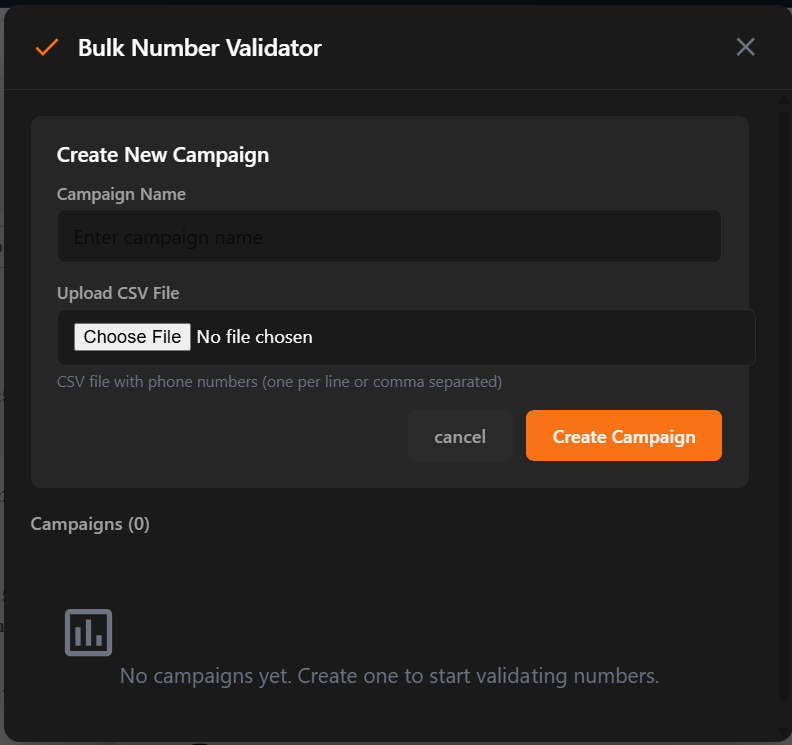
Lion CRM includes a built-in Bulk Number Validator that checks which numbers are active on WhatsApp before you send.
3. Use Proper Sending Delays
The biggest mistake businesses make is sending messages too fast. WhatsApp's algorithm detects inhuman sending patterns.
Recommended delay settings:
| Setting | Safe Value |
|---|---|
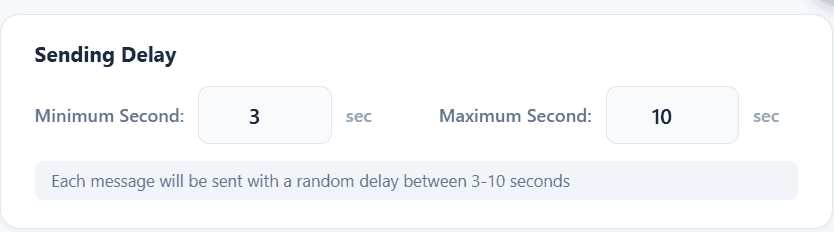
| Minimum delay between messages | 20-30 seconds |
| Maximum delay between messages | 60-90 seconds |
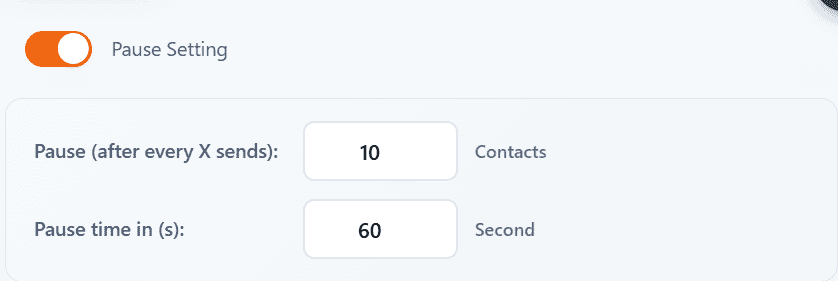
| Pause after every X messages | 10-15 messages |
| Pause duration | 5-10 minutes |
Lion CRM's bulk messaging feature includes advanced sending delay controls to keep your messaging pattern natural:
4. Use Random Intervals (Not Fixed Timing)
Bots send messages at exact intervals (every 30 seconds). Humans don't.
Configure your bulk sender to use random delays within a range. For example:
- Instead of: Every 30 seconds (bot pattern)
- Use: Random between 25-45 seconds (human pattern)
This randomization makes your sending pattern look natural to WhatsApp's detection system. Lion CRM's pause settings help you achieve this:
5. Warm Up New Numbers Before Bulk Messaging
Never start bulk messaging from a brand new WhatsApp number. WhatsApp watches new accounts closely.
7-Day Number Warmup Protocol:
| Day | Activity |
|---|---|
| Day 1 | Complete profile setup (photo, business description, address). Don't message anyone. |
| Day 2 | Have a friend message you first. Reply normally. |
| Day 3 | Join 1-2 small groups. React with stickers/emojis. |
| Day 4-5 | Send 5-10 personal messages to contacts who know you. |
| Day 6-7 | Gradually increase to 20-30 messages. |
| Week 2+ | Scale slowly. Don't exceed 50 messages/day until account is 30+ days old. |
6. Personalize Every Message
Sending identical copy-paste messages to hundreds of people is the fastest way to get banned.
Personalization strategies:
- Use recipient's name: "Hi {name}, we have an offer for you"
- Rotate message templates: Create 3-5 variations of the same message
- Add unique elements: Include order numbers, dates, or personalized details
- Vary greetings: Mix "Hi", "Hello", "Hey", "Good morning"
7. Maintain High Response Rate
One-way traffic is a major spam signal. If you send 500 messages but only get 2-3 replies, WhatsApp flags this as bot behavior.
Target response rate: Aim for at least 30% response rate to stay safe.
How to improve response rate:
- Send to opted-in contacts only (they're more likely to respond)
- Ask questions that encourage replies
- Send at optimal times (business hours: 9am-6pm)
- Make your messages valuable, not just promotional
8. Pause Between Message Batches
Don't send all your messages in one continuous session. Take breaks.
Recommended batch strategy:
- Send 10-15 messages
- Take 5-10 minute break
- Send next batch
- Don't message for more than 4-6 hours per day
- Avoid bulk messaging on consecutive days
9. Complete Your Business Profile
Accounts with incomplete profiles are more likely to be flagged as suspicious.
Complete these before bulk messaging:
- Profile photo (business logo)
- Business name
- Business description
- Business address
- Business category
- Email address
- Website link
10. Monitor Warning Signs
WhatsApp usually gives warnings before a permanent ban. Watch for these signs:
- "Your account may be restricted soon" notification
- Messages stuck on single tick (not delivered)
- Unable to send messages to new contacts
- "It looks like you may be using tools that don't follow our terms" message
If you see these warnings:
- Stop all bulk messaging immediately
- Wait 24-48 hours before resuming
- Reduce your daily volume significantly
- Review your contact list quality
Lion CRM Safe Bulk Messaging Features
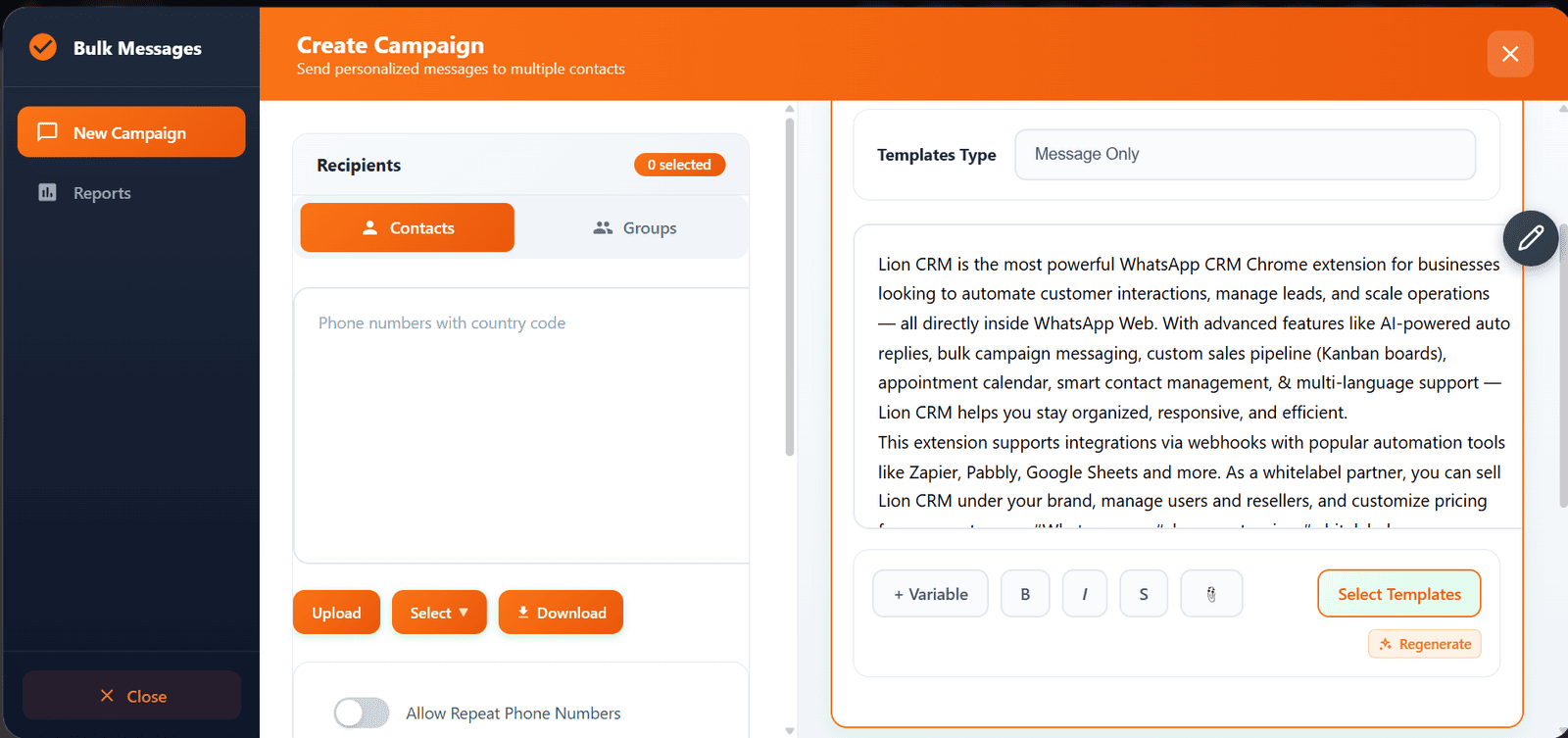
Lion CRM is a WhatsApp CRM Chrome Extension designed with safety-first bulk messaging in mind. Unlike risky bulk senders, Lion CRM includes built-in protections to keep your account safe.
Key Safety Features in Lion CRM Bulk Messenger
| Feature | How It Protects You |
|---|---|
| Sending Delay Control | Set minimum and maximum seconds between each message for natural sending pattern |
| Pause After X Sends | Automatically pause after sending a set number of messages |
| Pause Time Settings | Configure how long to pause between batches (in seconds) |
| Bulk Number Validator | Check which numbers are active on WhatsApp before sending |
| Random Delay Range | Uses random intervals within your range to mimic human behavior |
| Message Personalization | Add variables like {name} to personalize each message |
Why Choose Lion CRM for Bulk WhatsApp?
- Affordable Pricing: Starting at ₹1770/year (India) or $20/year (International)
- No API Required: Works directly with WhatsApp Web — no complex setup
- AI Chatbot Integration: ChatGPT, Gemini, and DeepSeek AI support
- Additional Features: Kanban CRM, message scheduling, webhooks, status automation
- Safe by Design: Built-in delays and validation to protect your account
- Whitelabel Available: Start your own WhatsApp CRM brand — check our pricing for whitelabel options
Compare Lion CRM with other WhatsApp CRM tools: Lion CRM vs Watidy Comparison
Step-by-Step: Send Bulk WhatsApp Messages Safely with Lion CRM
Follow this guide to send your first bulk WhatsApp campaign without risking your account.
Step 1: Install & Activate Lion CRM
- Go to Lion CRM on Chrome Web Store
- Click "Add to Chrome" and install the extension
- Purchase a license
- You'll receive a license key
- Open WhatsApp Web (web.whatsapp.com)
- Click the Lion CRM icon → Settings → Enter your license key → Activate
Step 2: Prepare Your Contact List
- Ensure all contacts have given opt-in consent
- Format numbers with country code (e.g., +91 for India)
- Use Lion CRM's Bulk Number Validator to check active numbers
- Remove invalid or inactive numbers from your list
Step 3: Configure Safe Sending Settings
- Open Lion CRM Bulk Message feature
- Set Minimum Sending Delay: 25-30 seconds
- Set Maximum Sending Delay: 60-90 seconds
- Set Pause After Every: 10-15 messages
- Set Pause Time: 300-600 seconds (5-10 minutes)
Step 4: Create Your Message
- Write your message with personalization variables: "Hi {name},"
- Keep message under 1000 characters for best delivery
- Make sure your message provides value to recipients
- Test send to yourself first to check formatting
Step 5: Send in Small Batches
- Start with 20-30 messages for your first batch
- Monitor delivery (double tick = delivered)
- Check for any warning messages from WhatsApp
- If all goes well, gradually increase to 50-100 per session
- Don't exceed your daily safe limits based on account age
How to Recover Banned WhatsApp Account
If your account gets banned despite precautions, here's what to do.
Types of WhatsApp Bans
| Ban Type | Duration | Recovery Chance |
|---|---|---|
| Temporary Ban | 30 minutes to 72 hours | Automatic — just wait |
| Extended Temporary | Days to weeks | Wait for timer to expire |
| Permanent Ban | Indefinite | Low (~2.6% success rate) |
How to Appeal a Permanent Ban
Method 1: In-App Appeal (Best Option)
- Open WhatsApp app
- Look for "Request a Review" button on the ban screen
- Enter the 6-digit SMS verification code
- Write a clear, polite explanation
- Submit and wait 24-48 hours
Method 2: Email Appeal
- Email: support@whatsapp.com
- For iPhone: iphone-support@whatsapp.com
Method 3: WhatsApp Contact Form
- Visit: https://www.whatsapp.com/contact
- Select: "WhatsApp Messenger Support" → "My Account was Banned"
- Fill in all required details
What to Include in Your Appeal
- Full phone number with country code
- Screenshot of ban message
- Clear explanation of your WhatsApp usage
- Acknowledge any unintentional violations
- Promise to comply with guidelines going forward
- Mention if this is your business number with customer contacts
Frequently Asked Questions
How many WhatsApp messages can I send per day without getting banned?
For a new account, stay under 40-50 messages per day. Established accounts (30+ days old) can safely send 100-200 messages daily with proper delays. The key is not just the number — it's also the sending speed, message quality, and response rate.
What is the best delay between WhatsApp bulk messages?
Use random delays between 25-90 seconds for the safest results. Additionally, pause for 5-10 minutes after every 10-15 messages. This mimics natural human messaging patterns and avoids WhatsApp's spam detection.
Is it safe to use bulk WhatsApp sender tools?
It depends on the tool. Avoid modified apps like GB WhatsApp or unofficial bulk senders. Use legitimate Chrome extensions like Lion CRM that work with WhatsApp Web and include safety features like sending delays, pause settings, and number validation.
Can I recover a permanently banned WhatsApp account?
You can try appealing through WhatsApp's in-app "Request a Review" feature or by emailing support@whatsapp.com. However, the success rate is low (around 2.6%). First-time offenders have better chances. Include your phone number, ban screenshot, and explanation in your appeal.
Why did WhatsApp ban my account for bulk messaging?
WhatsApp bans accounts that show bot-like behavior: sending identical messages too fast, messaging people who didn't opt-in, using unofficial apps, having low response rates, or getting multiple user reports. Focus on sending personalized, wanted messages at natural intervals.
What is the WhatsApp broadcast limit?
WhatsApp's built-in broadcast list has a 256 contact limit. Additionally, recipients must have your number saved to receive broadcast messages. For larger campaigns, you need a bulk messaging tool like Lion CRM or WhatsApp Business API.
Is Lion CRM safe for bulk WhatsApp messaging?
Yes, Lion CRM is designed with safety in mind. It includes sending delay controls, pause settings, bulk number validation, and works directly with WhatsApp Web (no modified apps). The key is to configure proper delays and send to opted-in contacts only.
How long should I warm up a new WhatsApp number before bulk messaging?
Wait at least 7-14 days before bulk messaging from a new number. During this time, complete your profile, have normal conversations, join groups, and gradually increase your daily message count from 5-10 to 30-50 messages.
Conclusion
Sending bulk WhatsApp messages without getting banned is absolutely possible when you follow the right strategies:
- Always get opt-in consent from recipients
- Validate numbers before sending
- Use proper sending delays (25-90 seconds random intervals)
- Pause between batches (every 10-15 messages)
- Warm up new numbers for at least 7 days
- Personalize messages — never copy-paste identical content
- Maintain high response rates (30%+ target)
- Use safe tools like Lion CRM with built-in protections
With WhatsApp's 98% open rate and 45-60% conversion rate, bulk messaging is one of the most powerful marketing channels when done correctly. The key is to treat WhatsApp as a relationship-building tool, not a spam platform.
🚀 Ready to Send Safe Bulk WhatsApp Messages?
Try Lion CRM's bulk messaging with built-in safety features — sending delays, pause settings, and number validation.
Get Lion CRM Now →