
You had a great conversation with a potential customer on WhatsApp. They seemed interested. They asked about pricing. They said "I'll get back to you." And then — silence. No reply. No purchase. No deal.
Sound familiar? You're not alone. Studies show that 80% of sales require at least 5 follow-up messages, but most business owners send only 1 or 2 — and then give up. Not because they don't care, but because manually tracking and sending a follow up WhatsApp message to dozens of contacts is exhausting, time-consuming, and easy to forget.
The result? Lost leads, lost revenue, and lost customers — all because there was no system in place to follow up consistently.
In this complete guide, you'll learn everything about the follow up WhatsApp message — how to write messages that actually get replies, the best timing strategies, and most importantly, how to automate your entire WhatsApp follow-up process so you never miss a lead again.
Who is this guide for? Small business owners, freelancers, real estate agents, coaching institutes, e-commerce sellers, and anyone who handles customer conversations on WhatsApp and wants to automate their follow-up process without the WhatsApp Business API.
Why Every Follow Up WhatsApp Message Matters
WhatsApp has over 2 billion users worldwide. In markets like India, Brazil, and Southeast Asia, it's the primary channel for business communication. When a customer reaches out on WhatsApp, they expect fast, personal responses.
But what happens after that first conversation? Most leads don't convert immediately. They need time to think, compare options, or discuss with someone. Without a follow up WhatsApp message, you're hoping they'll remember you — and hope is not a strategy.
Here's why sending a follow up WhatsApp message is critical:
- Keeps you top-of-mind — When a lead is comparing 3–4 options, the business that follows up is the one they remember
- Shows professionalism — A timely follow up WhatsApp message tells the customer you're serious about earning their business
- Recovers cold leads — Many "lost" leads aren't actually lost — they just need a gentle reminder
- Increases conversion rates — A systematic follow-up process can boost your close rate significantly
The Follow-Up Gap: Most businesses send 1–2 follow up WhatsApp messages and stop. But research shows that the highest conversion rates come from the 5th to 8th follow-up. If you're not following up consistently, you're leaving money on the table.
How to Write a Follow Up WhatsApp Message That Gets Replies
Not all follow up WhatsApp messages are created equal. A generic "Hi, any update?" rarely works. The key to an effective follow up WhatsApp message is making it personal, relevant, and easy to respond to.
5 Principles of a Great Follow Up WhatsApp Message
1. Use Their Name — A message that says "Hi Priya" feels completely different from "Hi." Personalization shows the customer they're not just another number in your contact list.
2. Reference the Previous Conversation — Remind them what you discussed. "Following up on the website design package we discussed last Tuesday" gives context instantly.
3. Add Value, Don't Just Ask — Instead of asking "Any update?", offer something useful — a case study, a limited offer, or a relevant tip. Give them a reason to re-engage.
4. Keep It Short — WhatsApp is not email. Long paragraphs get ignored. Keep your follow up WhatsApp message under 3–4 lines.
5. Include a Clear Next Step — End with a specific question or call-to-action. "Would Tuesday at 3 PM work for a quick call?" is better than "Let me know."
Pro Tip: Write your follow up WhatsApp message in a conversational tone — the way you'd naturally message a friend. Avoid overly formal language. People respond to people, not corporations.
The Perfect Follow-Up Timing Strategy
When you send a follow up WhatsApp message matters just as much as what you say. Send too early and you seem desperate. Send too late and they've already gone with a competitor.
Here's a proven timing framework:
- Follow-Up 1 (Same Day or Next Day) — A quick thank-you or summary of what was discussed
- Follow-Up 2 (Day 3) — A gentle check-in with added value — share a relevant resource or testimonial
- Follow-Up 3 (Day 7) — Address potential objections. "I understand you might be comparing options. Here's what makes us different..."
- Follow-Up 4 (Day 14) — Create soft urgency. "Just a heads up — our current offer is valid until the end of this month."
- Follow-Up 5 (Day 30) — The "door is always open" message. "No pressure at all. Just wanted you to know we're here whenever you're ready."
This sequence balances persistence with respect. Each follow up WhatsApp message adds value instead of repeating "any update?" — and the spacing gives the customer breathing room while keeping you top-of-mind.
Why Manual Follow-Ups Always Fail
Now you know what to write and when to send it. But here's the real challenge — doing this manually for every single lead, every single day.
If you have 10 active leads, that's 10 people to track, 10 different timelines, 10 different follow-up stages. With 50 leads? 100? It becomes impossible without a system.
Manual follow up WhatsApp messages fail because of:
- Forgetting — Life gets busy. You forget to send a follow up WhatsApp message to a hot lead, and by the time you remember, they've already bought from a competitor
- Inconsistent timing — Some leads get followed up in 1 day, others in 10 days. No system, no rhythm
- Copy-pasting the same message — Generic messages without personalization feel robotic
- No tracking — You have no idea which leads received follow-ups, which ones replied, and which ones fell through the cracks
This is exactly why businesses that rely on WhatsApp for sales need an automated follow-up system — one that sends the right follow up WhatsApp message, to the right person, at the right time, without you lifting a finger.
How to Automate Follow Up WhatsApp Messages with Lion CRM
Lion CRM is a WhatsApp CRM Chrome extension that works directly on WhatsApp Web. It adds a complete CRM system on top of WhatsApp — including a Follow-Up Funnel feature that lets you build automated follow up WhatsApp message sequences without the WhatsApp Business API, without coding, and without per-message costs.
Here's how to set up your first automated follow-up, step by step:
Open Follow-Up & Create New
Open Lion CRM's Follow-Up section and click "+ Create New". Give your follow-up a name (e.g., "New Lead Follow-Up" or "Payment Reminder") and assign it to a category for organized management.
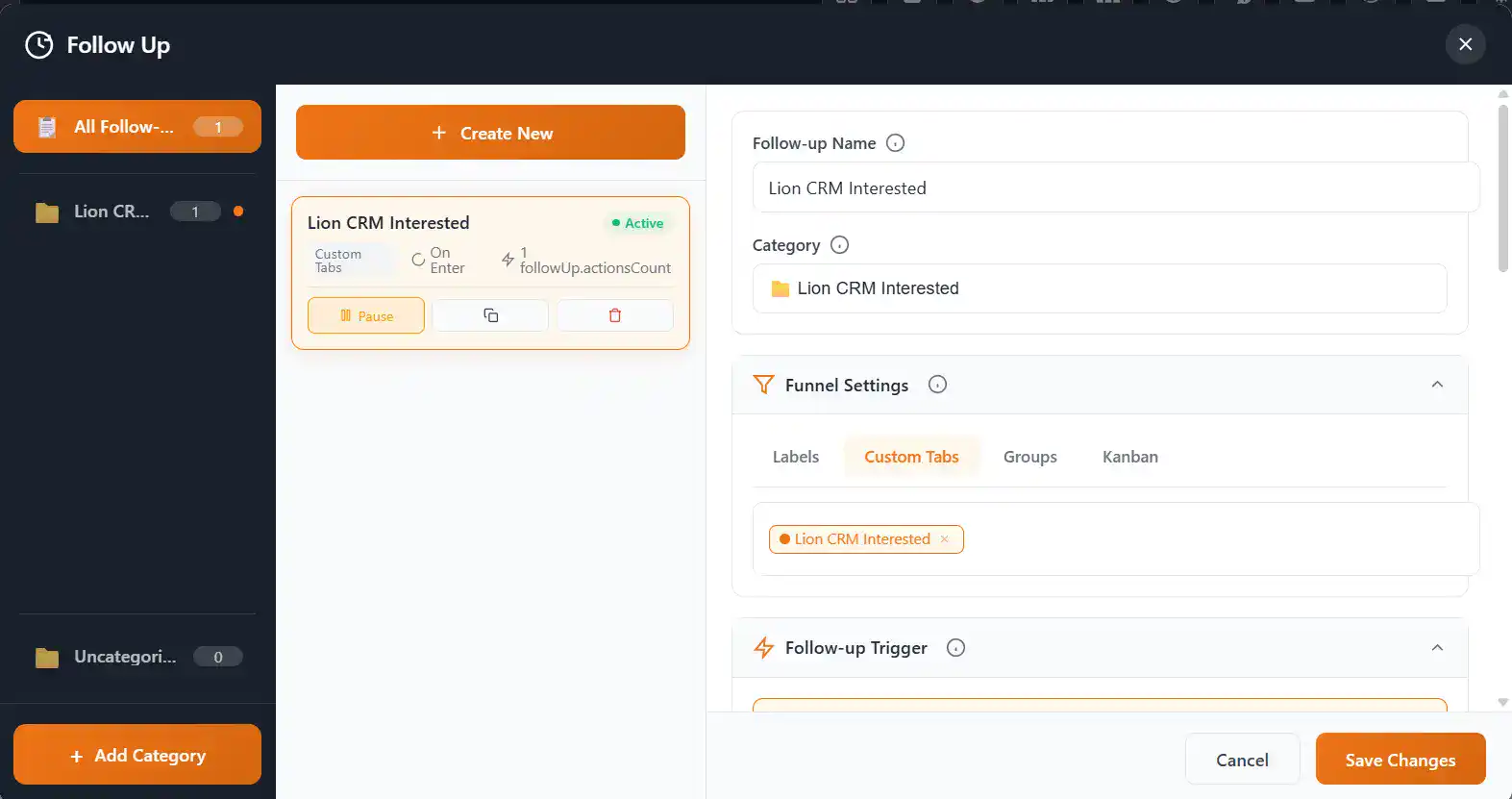
Follow-Up Dashboard — Create, Pause, Duplicate, or Delete your follow up WhatsApp message sequences
Set Your Funnel
Choose which contacts should receive this follow up WhatsApp message by connecting it to a funnel. You can connect to Labels, Custom Tabs, Groups, or Kanban boards. For example, connect it to a "New Leads" label — every contact tagged with that label automatically enters the follow-up sequence.
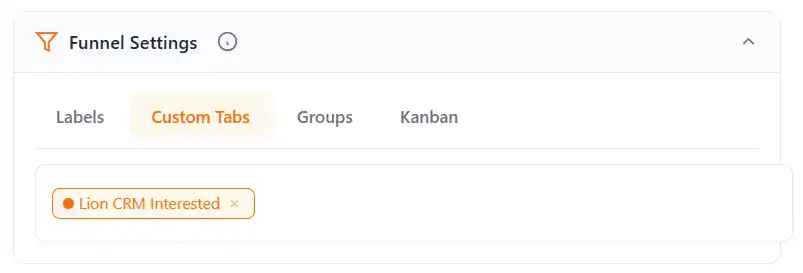
Funnel Settings — Connect to Labels, Custom Tabs, Groups, or Kanban
Choose Your Trigger
Select when the follow up WhatsApp message should fire. Lion CRM gives you 3 powerful triggers — explained in detail in the next section.
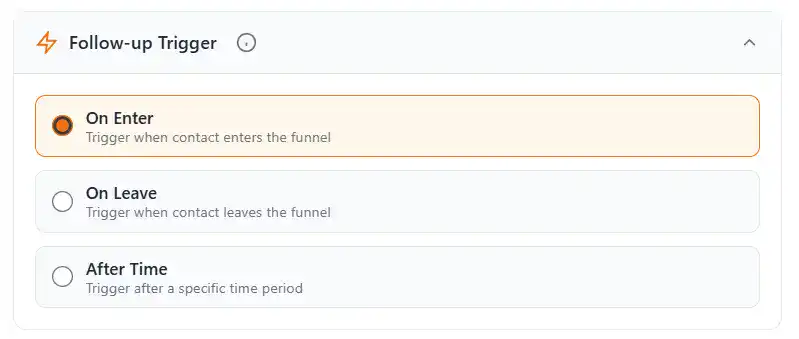
Three follow-up triggers — On Enter, On Leave, and After Time
Write Your Message with Dynamic Variables
Type your follow up WhatsApp message and personalize it using dynamic variables that auto-fill with each contact's real information. Set Min & Max Delay between messages for natural, human-like delivery.
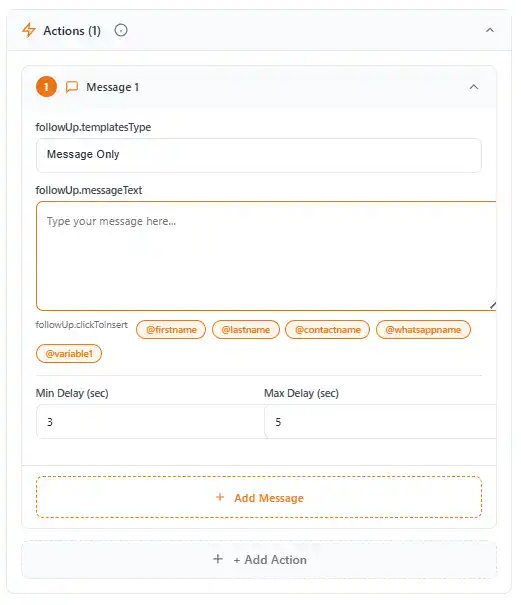
Message Builder — Personalized follow up WhatsApp messages with dynamic variables and smart delays
Click "Create Follow-up" — and you're done. From now on, whenever a contact enters (or leaves) your selected funnel, the follow up WhatsApp message fires automatically.
Unlimited Messages: You can add unlimited messages per follow-up sequence. Click "+ Add Message" to build a multi-step chain — first message on day 1, second on day 3, third on day 7, and so on.
3 Smart Follow-Up Triggers That Change Everything
The power of Lion CRM's Follow-Up Funnel lies in its trigger system. Instead of manually deciding when to send a follow up WhatsApp message, you set a trigger rule once — and the system handles everything automatically.
Trigger 1: On Enter
This trigger fires the moment a contact enters your funnel. If you label a new contact as "Hot Lead", the follow up WhatsApp message is sent instantly. Perfect for welcome messages, onboarding sequences, or instant acknowledgements.
Trigger 2: On Leave
This trigger fires when a contact is removed from a funnel. Use this for exit surveys, win-back messages, or re-engagement campaigns. Example: When a contact leaves your "Active Clients" tab, send a "We miss you!" follow up WhatsApp message.
Trigger 3: After Time
This trigger fires after a specific time delay — minutes, hours, or days after a contact enters the funnel. This is the most powerful trigger for building multi-step follow up WhatsApp message sequences. Example: Send a check-in 24 hours after the initial conversation, then another 3 days later.
Real-World Example: A real estate agent labels new property inquiries as "Interested Buyers". With the After Time trigger set to 1 day, each new inquiry automatically receives a personalized follow up WhatsApp message 24 hours later — without the agent remembering to send it.
Advanced Schedule — Daily, Weekly, Monthly Follow-Ups
Lion CRM's Follow-Up Funnel goes beyond simple one-time triggers. With Advanced Schedule Configuration, you can set follow up WhatsApp messages to run on specific days and times — automatically, on repeat.
When you enable Advanced Schedule, you get a 3-step wizard:
Choose Schedule Type
Select from Daily (specific dates of month), Weekly (selected weekdays), Monthly (specific dates each month), or Yearly (specific dates each year).
Step 1 — Choose from Daily, Weekly, Monthly, or Yearly schedule
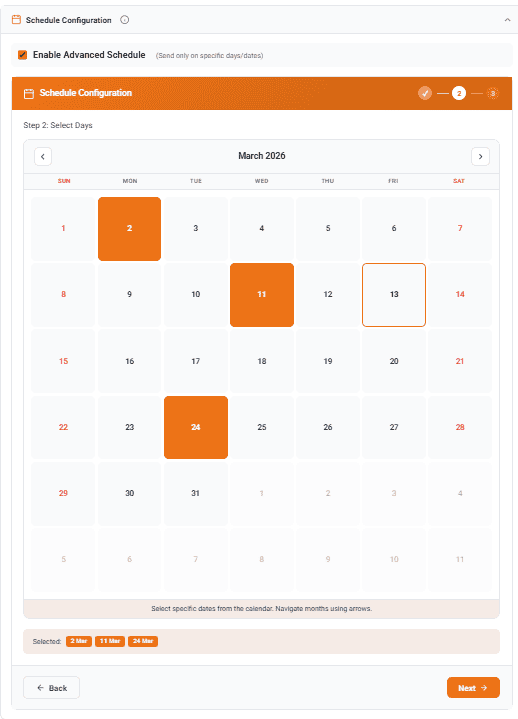
Select Days
Pick which days the follow up WhatsApp message should fire. For Weekly, choose specific weekdays (Mon–Sun). For Monthly, choose specific dates.
Set Time & Message Mode
Set the Send Time (e.g., 10:00 AM) and choose between Same Message for All Days or Different Message per Day — so you can customize what each day's follow up WhatsApp message says.
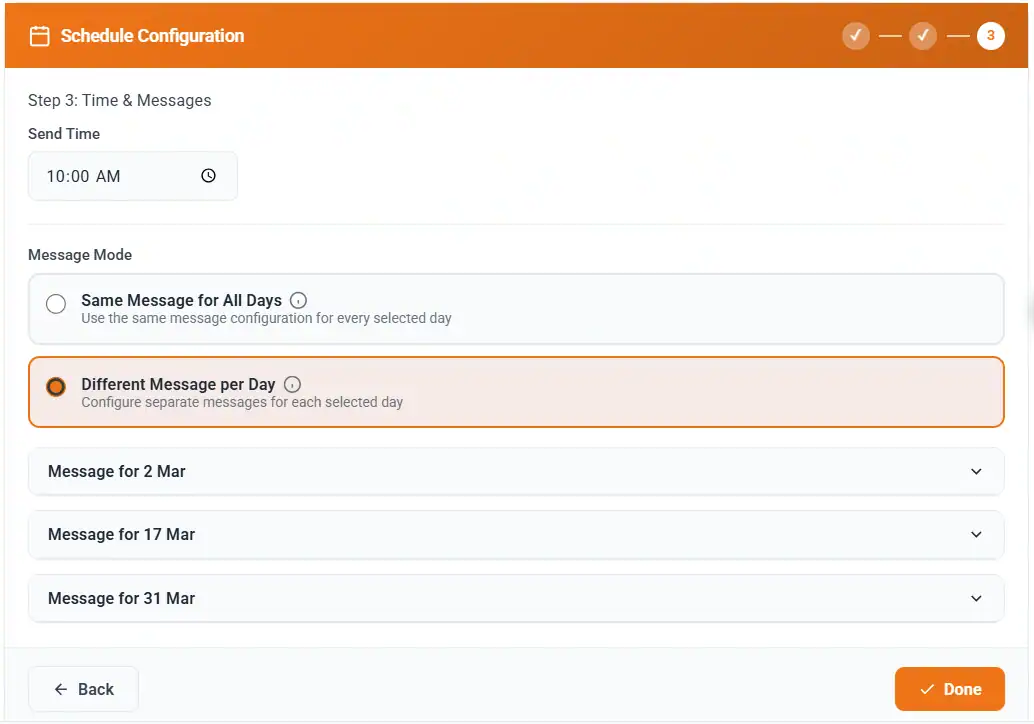
Step 3 — Set send time and choose message mode
Example: A coaching business sets a Weekly schedule for Monday and Thursday at 9:00 AM with Different Message per Day. Monday's message is a motivational tip, Thursday's message is a session reminder. All automated, all personalized with @firstname.
Smart Rules — Follow Up Without Spamming
Automated follow up WhatsApp messages only work if they're respectful. No one wants to receive 10 messages from a business that won't stop messaging. Lion CRM solves this with Trigger Rules — smart controls that ensure your follow-ups stay professional and spam-free.
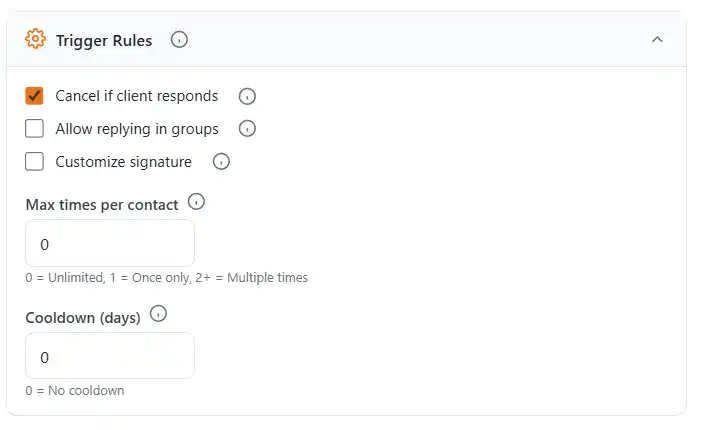
Trigger Rules — Smart controls to prevent over-messaging
- Cancel if Client Responds — The moment a customer replies, the entire follow-up sequence stops automatically. No more sending messages to people who already responded
- Max Times per Contact — Set how many times a single contact can receive this follow-up. Use "0" for unlimited, "1" for once only
- Cooldown Days — Set a minimum gap between follow-up sequences to prevent over-messaging
- Allow Replying in Groups — Toggle whether follow up WhatsApp messages should fire in group chats
- Customize Signature — Add a custom signature to each follow-up for a professional touch
Post Actions — What Happens After the Follow-Up?
After a follow-up sequence completes, you can trigger Post Actions to automatically organize your contacts:
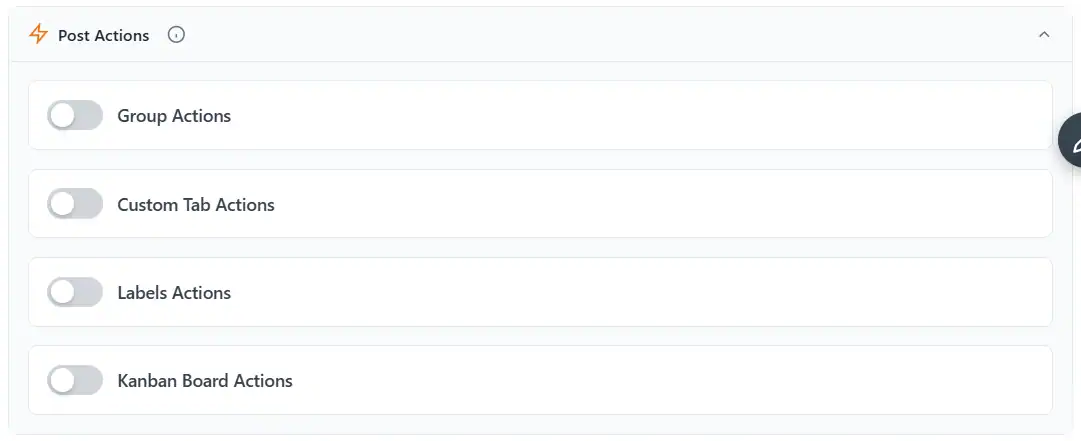
Post Actions — Automatically move contacts after follow-up completes
- Group Actions — Add or remove the contact from a WhatsApp group
- Custom Tab Actions — Move the contact to a different custom tab
- Labels Actions — Add or remove a label
- Kanban Board Actions — Move the contact to a different Kanban stage
This means your follow-up system doesn't just send a follow up WhatsApp message — it also organizes your pipeline automatically. A lead that completes the sequence can be moved from "New Lead" to "Follow-Up Completed" in your Kanban board without manual work.
Important: Lion CRM is a Chrome extension that works on any Chromium browser (Chrome, Brave, Edge). The Follow-Up Funnel works when your computer is ON and WhatsApp Web is open. This is not a cloud service — automated follow up WhatsApp messages fire only while your PC and browser are active.
Watch It in Action
See the complete Follow-Up Funnel setup in this walkthrough video — from creating your first follow-up to watching triggers fire in real time with live WhatsApp contacts:
More Lion CRM Guides
- How to Set Up WhatsApp Auto Reply Without API — No-Code Chatbot Flows
- How to Schedule WhatsApp Messages — Auto Send at the Perfect Time
- How to Send Bulk WhatsApp Messages Without Getting Banned
- Best WhatsApp CRM Extensions for Chrome — Rebrand and Sell
Frequently Asked Questions
Can I automate follow up WhatsApp messages without the WhatsApp Business API?
Yes. Lion CRM is a Chrome extension that works directly on WhatsApp Web. You can set up automated follow-up sequences using the Follow-Up Funnel feature — no API, no coding, and no per-message costs. Install the extension, open WhatsApp Web, and your 7-day free trial activates automatically.
Will my WhatsApp account get banned for sending automated follow-ups?
Lion CRM includes smart trigger rules like Cancel if Client Responds, Max Times per Contact, Cooldown Days, and Min/Max Delay between messages. These ensure your follow up WhatsApp messages are delivered naturally. Always follow WhatsApp's terms of service.
What are the three follow-up triggers in Lion CRM?
On Enter (fires when a contact enters a funnel), On Leave (fires when a contact leaves), and After Time (fires after a delay in minutes, hours, or days). You can connect triggers to Labels, Custom Tabs, Groups, or Kanban boards.
Can I personalize follow up WhatsApp messages with the customer's name?
Yes. Lion CRM supports dynamic variables: @firstname, @lastname, @contactname, @whatsappname, and @variable1. These are automatically replaced with real contact information when the message is sent.
Does Lion CRM work offline?
No. Lion CRM is a Chrome extension that works on any Chromium browser (Chrome, Brave, Edge). It only functions when your computer is on and WhatsApp Web is open. Automated follow-ups fire only while your PC and browser are active.
Can I schedule follow up WhatsApp messages for specific days?
Yes. Advanced Schedule Configuration lets you set Daily, Weekly, Monthly, or Yearly schedules. Pick days, set send times, and choose same message for all days or different messages per day.
How many follow-up messages can I add in one sequence?
Unlimited. Click "+ Add Message" to add as many messages as you need. Each message can have its own Min and Max delay for natural delivery timing.
What happens after a follow-up sequence completes?
Post Actions let you automatically organize contacts — move them to a different group, custom tab, label, or Kanban board stage. Your pipeline stays organized without manual work.
Try Lion CRM Free for 7 Days
Install the extension, open WhatsApp Web — your 7-day free trial activates automatically. No credit card, no sign-up forms, no contact needed.
Add to Browser — Free TrialJoin Our WhatsApp Channel
Get tips, feature updates, and WhatsApp automation tricks — directly on WhatsApp.
Follow Lion CRM on WhatsApp