


Honestly? When we built Lion CRM, we never planned to be a whitelabel platform. We just wanted to fix our own WhatsApp mess at LotsOfCode — the broken broadcast tools, the bans, the agents tripping over each other in one shared inbox. Whitelabel happened because the agencies and resellers we sold to kept asking us, “Bhai, can we sell this under our own brand?” Eventually we said yes. Three years later, that decision quietly became one of the most profitable parts of our business. And it taught us a lot about what actually works in the whitelabel WhatsApp CRM software market — and what’s marketing fluff.
If you’re reading this, you’re probably an agency owner, an SaaS founder, or a digital marketer in India, Brazil, or LATAM, and you’re staring at the numbers thinking: 3 billion people on WhatsApp, 50 million businesses on WhatsApp, why am I not selling them something? You’re right. The opportunity is real. But the path is full of expensive surprises that the “launch in 7 days” landing pages won’t tell you about.
If you’d rather watch than read, we publish walkthroughs and feature demos of Lion CRM on the LotsOfCode YouTube channel — same material, different format. Either works. This guide is the playbook we wish we’d had before we started. We’ll go through what whitelabel WhatsApp CRM software actually is, what to look for in a provider, how the pricing models really work (one-time, hybrid, tiered, and BSP-markup — they’re not the same animal), what kind of margins are realistic, and where most resellers lose money. We’ll also be honest about when whitelabel is the wrong call and you should just build it yourself.
What is whitelabel WhatsApp CRM software, really?
Strip away the buzzwords and there are actually two distinct architectures that get sold under the same “whitelabel WhatsApp CRM” label, and they’re fundamentally different products. Picking the wrong one for your buyer will sink you, so this is the most important thing to get right before anything else.
Architecture A: Cloud / API-based platforms. These run on the official WhatsApp Business Platform API through a Meta-approved BSP (Business Solution Provider). Your end-customer’s messages flow through Meta’s servers via your provider’s cloud infrastructure. Wassenger, QuickReply, BotPenguin, AiSensy, WaliChat, and most of the names you’ll see on the first page of Google sit here. They get the official API access and the resulting features (template messaging, broadcast at scale, click-to-WhatsApp ads), and they pay Meta’s per-conversation pricing. They also need formal Meta partnership, BSP approval, and per-customer onboarding through Meta’s verification.
Architecture B: WhatsApp Web Chrome-extension overlays. No Meta partnership, no API, no BSP. The product runs as a browser extension on top of the user’s own WhatsApp Web session. The user’s own number sends and receives messages; the extension just adds a CRM layer (contact tags, broadcast queue, templates, automation, kanban) directly inside web.whatsapp.com. This is what we are at Lion CRM. We don’t have a Meta partnership. We don’t use the Cloud API. We don’t sit in the BSP program. The product runs locally in the user’s browser, with all data stored on their own device — no third-party servers see customer conversations.
Both architectures get bundled into “whitelabel” packages where you (the reseller) plug in your logo, your colors, your domain link, and resell as if you built it. But the buyer experience and the cost structure are completely different. Read this section twice before you commit to a provider.
The “white” in whitelabel just means: the buyer (your customer) never sees the underlying provider. They get a branded extension or a branded dashboard, they pay you, your name is everywhere they look. Behind the scenes, your provider’s infrastructure (or in our case, just the user’s own browser) does the actual messaging work.
What a Chrome-extension whitelabel actually delivers (Lion CRM’s 16 features)
Since this matters for how you sell to end-customers, here’s the actual functional surface a Lion CRM reseller is shipping. We don’t reinvent WhatsApp; we add a CRM layer inside the user’s WhatsApp Web tab. The user keeps their normal number, their normal contacts, their normal account — the extension just gives them tools to manage business communication without leaving WhatsApp.
The 16 features, grouped by what they’re for:
- Sending and broadcasting: Bulk Messaging (with smart delays), Message Templates (unlimited, keyboard shortcuts), Quick Reply (instant responses), Custom Signature, Bulk Number Validator (verify numbers before sending; the site claims roughly a 40% improvement in delivery rates by skipping invalid numbers).
- Organizing customers and conversations: Custom Tabs (organize chats by Leads / Customers / VIP / Support), Kanban Board (Lead → Prospect → Customer → VIP visual pipeline), Profile Chat (full contact profile with notes, tags, history), Chat Toolbar (templates, notes, tags from inside any conversation).
- Automation and scheduling: Smart Calendar (schedule messages, reminders, automate communication), WhatsApp Status Automation (auto-post status updates from a content queue).
- Integration and AI: AI Integration (connect ChatGPT, Gemini, or DeepSeek with your own API key for replies / translations / sentiment), Powerful WebHooks (Zapier, HubSpot, Google Sheets, custom apps), Configure API (build custom integrations on top of Lion CRM).
- Operations and language: 9 Languages (EN, PT, ES, HI, DE, FR, IT, NL, plus more), Backup & Restore (settings, templates, contacts).
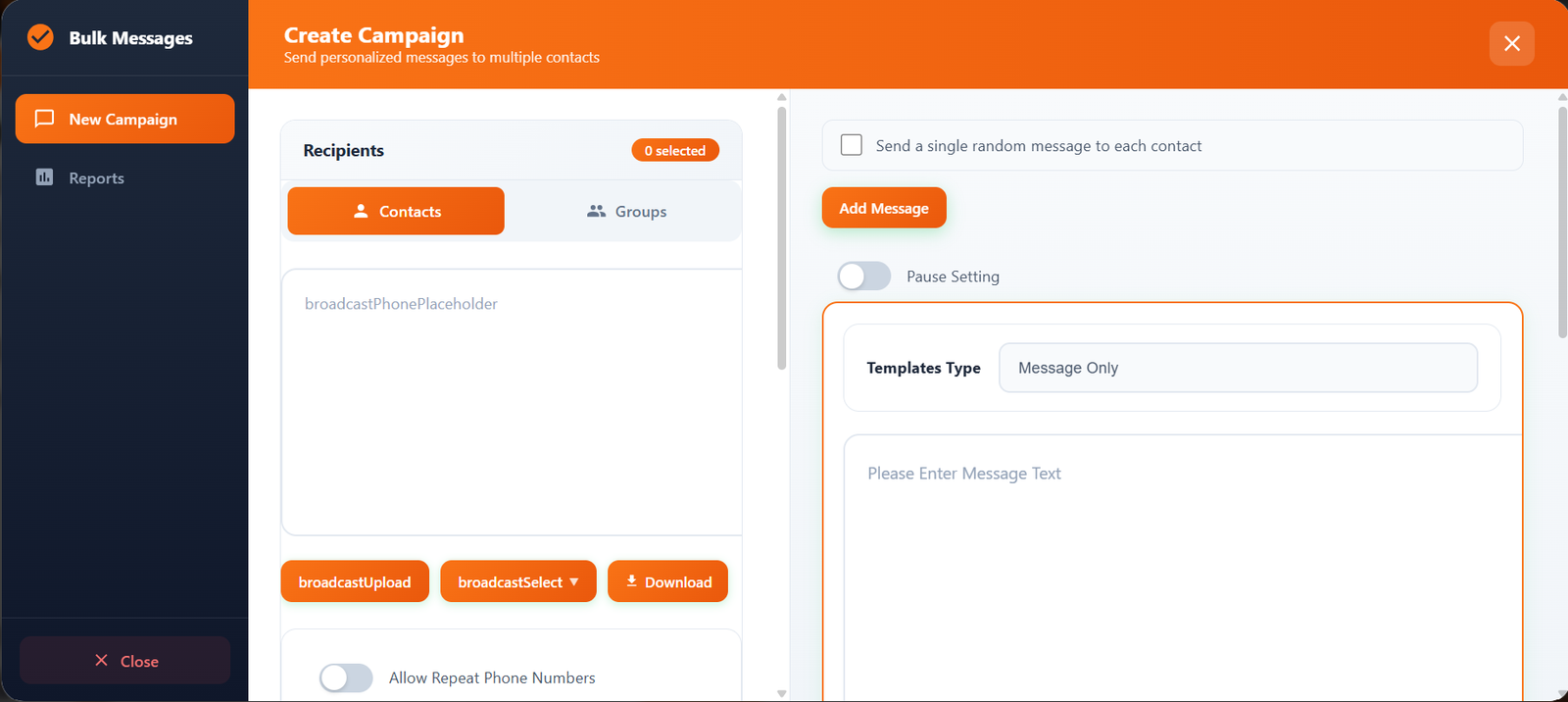
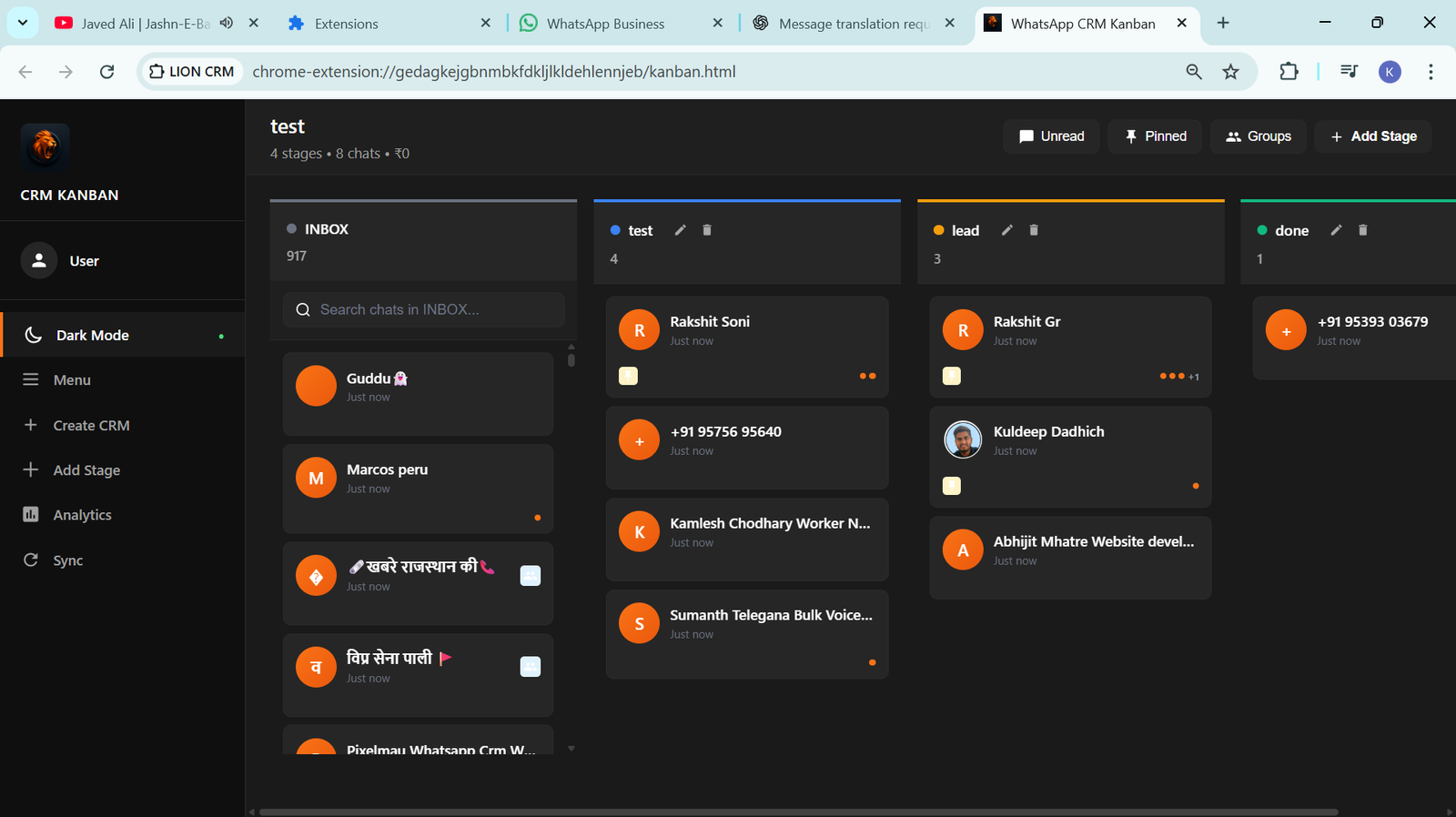
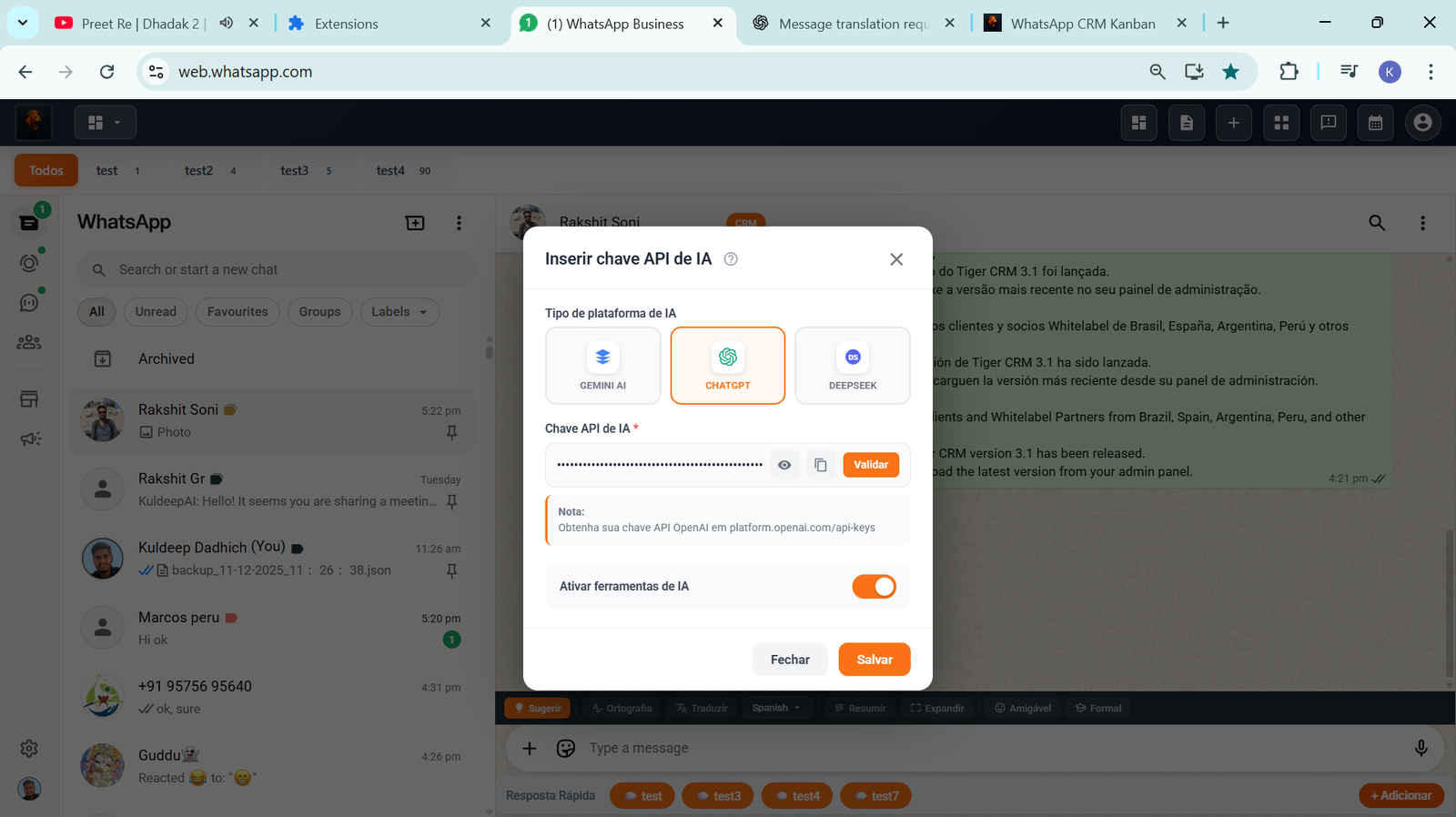
Two design choices worth flagging because they affect how you pitch this to buyers:
- 100% local data storage. Contact lists, conversation tags, notes, templates — all stored on the user’s device, not on our servers. For privacy-conscious buyers (clinics, small accounting firms, anyone with sensitive customer data), this is a real selling point. No third-party server holds their customer database.
- No API setup, no Meta verification, install in minutes. Compare to API/BSP setups that take weeks of approval per customer. Tell a small business owner “install this Chrome extension and you’re done in 5 minutes” and you’ve removed 90% of the friction the BSP-based competitors carry.
Why the whitelabel route became popular (and why it’s not for everyone)
Building a real WhatsApp CRM from scratch is genuinely hard. The level of “hard” depends on which architecture you pick.
If you go Cloud / API-based: you need WhatsApp Business API approval (Meta’s process, can take weeks), BSP partnership (Meta requires resellers to work with Solution Partners), session management and reconnection logic, broadcast queuing that doesn’t trigger bans, template management that complies with Meta’s strict 24-hour messaging window, per-customer Meta verification and template approval, conversation routing across multiple agents, contact deduplication, multi-tenant data isolation, per-conversation Meta pricing pass-through, billing, plus the actual UX. The honest estimate from most teams who’ve tried is 18 to 36 months and somewhere between $80,000 and $250,000 in development cost before your first paying customer. The Oyelabs team puts the high end at “seven figures” if you go enterprise-grade.
If you go Chrome-extension overlay (the path Lion CRM took): you skip Meta’s API and BSP entirely. The product is a browser extension that hooks into the user’s own WhatsApp Web session. You still need a serious chunk of work — UI inside WhatsApp Web (chat toolbar, kanban, templates panel), broadcast queuing with safe delays, contact tagging, message-template management, multi-language UI, AI integration if you offer it, an admin/licensing backend so you can sell it. But you don’t need Meta approval, no BSP partnership, no per-conversation pricing. The product runs locally on each user’s device. Realistic build estimate: 6–12 months and $30,000–$80,000. Different problem, different math.
Whitelabel — either flavor — collapses all of that for the reseller. You skip the build. Your provider has already done the architecture work. You spend your time on what actually matters: branding, sales, support, and pricing.
That’s the appeal. But whitelabel is the wrong call if:
- You want to deeply customize the underlying messaging engine (you can’t — you’re locked to your provider’s roadmap).
- You’re targeting a single huge enterprise client who needs an exclusive integration (build custom).
- You don’t have an existing audience or distribution — whitelabel doesn’t solve “no customers.” It solves “no product.”
If those three don’t apply, whitelabel is almost always the right move. You’ll be in market in weeks, not years. And you’ll still own the customer relationship, the brand, and the upsell.
The pricing models nobody explains clearly
This is where most resellers get burned. The whitelabel WhatsApp CRM market has four distinct pricing models, and the math between them is brutally different over 12 months. Don’t let any provider tell you they’re “the same as everyone else but cheaper” — the structure matters more than the headline number.
Model 1: Pure one-time license, no recurring fees
You pay a single setup fee. After that, you keep 100% of what your customers pay — no platform commission, no monthly cut, no per-user fee. Wassenger does this at $499 setup fee. A few smaller players do $200–$1000 one-time fees too.
The math: if you charge your end customer $30/month, after 12 months you’ve collected $360. At Wassenger’s $499 setup, you’re underwater for the first year on that one customer. At $80/month per customer, you net $461 in year 1 and the full $960 every year after.
Best fit: resellers who price end-customers at $50+/month and have a few customers each generating real revenue.
Model 2: Hybrid — small one-time license + low per-user fee (this is what we do at Lion CRM)
You pay a small one-time license to unlock the whitelabel build, then a small per-user-per-month fee for each active end-user license you sell. The per-user fee covers our hosting, updates, support, the extension build pipeline — the things that actually keep costing money on our side.
Lion CRM’s three tiers (publicly listed on our pricing page):
- Starter: $150 (~₹15,000) one-time license + $2.50/user/month
- Growth: $200 (~₹20,000) one-time license + $2.00/user/month
- Enterprise: $250 (~₹25,000) one-time license + $1.00/user/month
The math at Starter, the cheapest tier: charge your end-customer $30/month for one user license, your cost per active user is $2.50/month. Monthly margin: $27.50 per user. Year 1 on a single customer: $360 collected − $30 (one-time license amortized over the customer’s first year) − $30 of per-user fees = roughly $300 net. Year 2 onwards: $360 − $30 = $330 net per customer. The hybrid model has the lowest first-year break-even of any of the four models, which is why most starting resellers prefer it.
Two honest caveats on Lion CRM specifically. First: there is a 30 active user license minimum after a 3-month grace period, or your whitelabel deployment is suspended. We added that policy after early resellers bought the build and then never sold a single seat — the per-user fee floor exists to keep this from being a cheap way to acquire and abandon the product. Second: the per-user fee scales with your end-customer count, not their conversation volume, so chatty customers don’t blow up your costs the way they would on a BSP-markup model.
Model 3: Tiered partner program with platform fees (Bronze/Silver/Gold/Platinum)
QuickReply, BotPenguin, and several others run multi-tier partner programs. You buy at a discounted rate (sometimes 80% off retail, marketed loudly) and resell at retail. Sounds great until you realize: you’re paying a monthly platform fee per customer, forever.
The math: if you charge $30/month and your wholesale cost is $6/month (80% off $30 retail), that’s $24 net. But it’s $24 every single month for as long as the customer stays. If your customer churns, your margin disappears. And if the platform raises prices, your margin shrinks.
This model is fine if you’re a high-volume reseller running a sales-led business with thousands of customers. It’s painful if you’re a small agency with 20–100 clients — the platform fees nibble away at your margin every month.
Model 4: Pure usage-based (BSP markup)
Some providers route everything through Meta’s official BSP and you mark up the conversation pricing. WaliChat, Whapi.cloud, and most “pure API” players work this way. You make money on per-conversation markup, but the unit economics depend entirely on how chatty your customers’ end-users are.
This is the model for technical resellers who want full transparency on Meta’s pricing. It’s not great for non-technical agencies because you have to teach every customer how the conversation pricing works.
Which model do most agencies actually pick?
From what we see in the Indian and LATAM agency market:
- Model 1 (pure one-time) wins for resellers who can sustain a few months of payback and price end-customers above $50/month.
- Model 2 (hybrid) wins for sub-100-client resellers in price-sensitive markets — lowest first-year break-even, predictable per-user cost. Most Lion CRM resellers fit here.
- Model 3 (tiered) wins for resellers with >500 clients and a dedicated sales team where the per-customer platform fee is amortized across high volume.
- Model 4 (BSP) wins for technical agencies who already understand Meta’s BSP pricing and want full transparency.
If you’re starting out, default to Model 2 unless you can confidently price end-customers above $50/month, in which case Model 1 also works.
Ready to start? Try Lion CRM Whitelabel.
One-time license from $150. Same-day deployment. 7 days free for your test license. Sell under your own brand from day one — keep 100% of what you charge end-customers.
How to evaluate a whitelabel WhatsApp CRM provider (the actual checklist)
Most “comparison” articles online list 30 features and call it a day. That’s useless when every provider claims to have every feature. Here’s the checklist that actually matters:
1. Pricing transparency
If the website doesn’t clearly state pricing, walk away. The good providers publish exact numbers. The mediocre ones make you “request a demo” so a sales rep can size you up. You don’t have time for that.
2. Time to first whitelabel launch
Real providers have you live in 24–72 hours. Lion CRM does same-day deployment for the whitelabel package. Wassenger advertises 7 days. QuickReply says 7–10 days. If a provider says “1–2 weeks for branding setup,” they’re slow — that work is mostly DNS and config which is hours of work, not weeks.
3. Branding scope — and whether you actually need a domain
This is where the architecture of your provider matters more than people realize. There are two flavors of “whitelabel” in this market and they have completely different branding mechanics:
Hosted-SaaS whitelabel (Wassenger, QuickReply, BotPenguin, most “dashboard” providers): you give them a custom domain, they handle the DNS pointing and SSL, and your customers log into app.yourbrand.com. Branding lives in the dashboard UI. Watch for: provider domain leaking in admin pages, in payment processing redirects, in API responses, in “powered by” footers. Demand a full demo on a real custom domain before signing anything — some “whitelabel” platforms only repaint the front page and the rest is still on the provider’s domain.
Chrome-extension whitelabel (Lion CRM, and a small number of competitors): there is no hosted dashboard your customers log into. The entire product runs as a Chrome extension on your customer’s machine, on top of WhatsApp Web. Branding is configured client-side in the extension itself — logo, colors, name, support number, and your own website link — not on a server you control. Your customers never see the provider’s domain because there’s no provider domain to see. They just install your branded extension from a private build link and use it.
An important nuance most providers don’t explain clearly: even though there’s no hosted dashboard, the partner does typically have their own brand domain — they just don’t host the application on it. With Lion CRM, you can plug your own domain URL into the extension’s branding section, and that URL becomes the “website” link, the support link, the “powered by” link inside the extension. Your end-customer clicks any of those and lands on yourbrand.com. But none of the WhatsApp messaging, contact data, or admin panel actually runs on your domain — that all stays on our infrastructure, hidden from end-customers.
This matters because Chrome-extension whitelabel skips the entire “DNS + SSL + payment redirect” surface where leaks usually happen on the application side. There’s no server-side surface to leak from. The trade-off: you don’t get a hosted dashboard look-and-feel, and your customer needs Chrome (or a Chromium browser). For agencies serving SMBs who already use WhatsApp Web, this is rarely a real friction.
The reseller-facing admin panel (where you create end-user licenses, manage your branding, top up your wallet) is at admin.lioncrm.site. That URL is visible only to you, the whitelabel owner — never to your end-customers. End-customers only ever see your branded extension and any links inside it that point back to your domain.
There’s an optional $250 one-time webstore-setup add-on if you want us to spin up a public marketing site under your brand for end-user signup, but it’s not required — many resellers run sales entirely off WhatsApp DMs and a simple landing page they already own.
When you’re evaluating providers, the question to ask is “do my customers’ WhatsApp messages and contact data ever flow through a URL that I control?” If yes, you’re on Hosted-SaaS — demand the custom-domain demo and the data-export terms. If no, you’re on Chrome-extension — check that the extension build pipeline lets you change every visible string, icon, color, and outbound link without contacting support every time.
4. WhatsApp ban protection — the part most providers oversimplify
This is the most misunderstood topic in the category. Let’s be honest about what actually triggers WhatsApp bans, because the marketing copy on most provider sites glosses over it.
Bans happen primarily when you message unknown / new contacts in bulk. The classic risky pattern: importing 5,000 random numbers you scraped, blasting them all the same message, your number flagged in days. WhatsApp’s spam-detection signal is heavily weighted on “people you’ve never talked to who report or block you.” If everyone you message is someone who already messaged you (a customer, a lead who opted in, a contact you have a real relationship with), the ban risk drops dramatically. This is why “broadcast to your customer list” rarely results in bans, while “cold outreach to a scraped list” almost always does.
What good Chrome-extension and API-based platforms both do for safety:
- Human-like delay randomization — messages don’t go out at the exact same interval, so it doesn’t pattern-match a bot
- Pause settings — throttle by hour, day, or after every N messages
- Bulk number validation — verify a list contains real WhatsApp numbers before you send (cuts bounce-driven flags)
- Quality-over-quantity guidance in the product UI — warn the user before they send a clearly-risky volume
What no provider can promise: zero bans on cold outreach. If your buyer’s use case is mass-messaging cold lists, push back — they’ll churn after their second ban anyway.
Ask your provider directly: “What’s your account-ban rate across all whitelabel deployments?” If they don’t have a number, they’re not measuring it. We track ours and the meaningful number is the rate among users following the platform’s safe-send guidelines — which is materially lower than the rate among users who skip the guidelines and send to scraped lists. Same as any other tool: it’s not the platform, it’s how it’s used.
5. Multi-language support
If you’re selling in India, you probably need Hindi. Brazil — Portuguese. LATAM — Spanish. Lion CRM ships with built-in language switching for the extension UI in 9 languages: English, Portuguese, Spanish, Hindi, German, French, Italian, Dutch, plus more being added. Most competitors are English-only or have machine-translated UI that reads weirdly. This actually matters when you’re onboarding non-technical customers in Pune, São Paulo, Lima, or Buenos Aires — they want the product itself to feel native, not just a translated marketing site.
6. Migration path off the platform
If your provider goes down or raises prices, what happens to your customers? Ask: can I export every customer’s contact list, conversation history, and template library in standard formats? If the answer is no, you’re locked in. We export everything as CSV and JSON, no questions asked. Most established competitors do too. The newer ones often don’t.
7. Real founder-led support
The boring truth: when something breaks, you want to be able to message a person who can actually fix it. Not a tier-1 support agent reading a script. We answer support directly because we’re a small team and we built the thing. Wassenger and the larger ones have proper support orgs which is fine for scaled resellers but slower for urgent issues.
The numbers we don’t see talked about
Three things the “launch your own SaaS” landing pages never tell you:
Customer acquisition cost (CAC) in this niche is brutal
The “easy SaaS recurring revenue” pitch ignores that you still have to find customers. In our experience, agency-style outbound (LinkedIn DMs, cold email, WhatsApp groups) gets you the first 10 customers cheap because you’re using personal network. Customers 11–50 cost real money — usually $50–$200 each in paid ads, content marketing, or partnership deals. If you don’t have a distribution channel before you start, the whitelabel platform is the easy 10% of the problem; the other 90% is sales.
Churn is silent at first, painful later
WhatsApp CRM customers churn for unsexy reasons: they got banned, their business slowed down, they switched to a cheaper competitor, they decided to handle WhatsApp manually again. Expected churn for a small-business CRM in this category is 4–8% monthly. That means at 6% monthly churn, half your customers are gone in a year. Plan your CAC around this. If your acquisition cost is higher than 6 months of revenue, the math doesn’t work.
The $150-once pricing only works if you don’t oversell
We learned this the hard way. The whitelabel package is one-time, but our infrastructure cost is recurring. If you onboard a thousand whitelabel customers in a month and they each spin up 50 end-customer accounts, our servers melt and we lose money on the early adopters. So we have a soft cap: each whitelabel deployment supports a reasonable end-user volume on the standard plan, with clear paths to upgrade if you blow past that. Most resellers never hit the limit, but it’s there. Always read the fine print on infrastructure limits.
Use cases where whitelabel WhatsApp CRM actually wins
Some markets are perfect for this play. Some are not. From three years of conversations with resellers, here’s the breakdown:
Agencies serving local SMBs
Best fit. Local restaurant chains, real-estate offices, healthcare clinics, coaching businesses — they all need WhatsApp marketing but don’t want to learn the API themselves. They’ll happily pay an agency $30–$80/month to handle it. Your job: package the CRM, train them in 1 hour, charge monthly. Ten clients = $300–$800 monthly recurring revenue. Fifty clients = real income. Lion CRM resellers in Bangalore, Pune, São Paulo, and Mexico City have been running this exact playbook.
Vertical SaaS founders
If you already sell software to a specific industry — say, dental clinics or yoga studios — bolting on a whitelabel WhatsApp CRM is an obvious upsell. Your customers already trust you. They already pay you. Adding “WhatsApp marketing module powered by [your brand]” usually 1.5–2x’s your ARPU.
WhatsApp consultants who hit their ceiling
Solo consultants who set up WhatsApp Business for clients eventually run out of hours. Whitelabel CRM lets you productize what you were doing manually. Now your client logs into a dashboard instead of asking you for help every Friday.
Where it doesn’t work
- Pure consumer audiences. WhatsApp CRM is a B2B tool. If your audience is end consumers, you’re solving the wrong problem.
- Heavily regulated industries (healthcare records, banking compliance) where the WhatsApp platform itself isn’t suitable. Don’t try.
- Markets where WhatsApp adoption is low. Doesn’t apply to India or LATAM, but if you’re targeting Western Europe or North America B2B, the channel itself isn’t where buyers are.
How to actually set up a Lion CRM whitelabel (the click-by-click)
Most “comparison” articles never show you what the actual setup flow looks like. Here’s exactly how a Lion CRM whitelabel goes from “I just paid” to “I have a branded extension I can sell”:
- Open the admin panel. Go to admin.lioncrm.site. This URL is for whitelabel owners only — your end-customers will never see it. Register an account, then log in.
- Buy a plan. You can’t do anything else until you’ve picked a tier (Starter / Growth / Enterprise) and paid. Pick based on how cheap you want the per-user-month fee to be over time — if you’re confident you’ll cross 100+ active users in 12 months, the Growth or Enterprise tier pays for itself fast.
- Land on the dashboard. After payment, the panel redirects you to your reseller dashboard. The Overview section gives you a 1-month free license to use the extension yourself — install that first and use the product as a customer would. You’ll spot rough edges in your own onboarding flow before any real client does.
- Go to the Branding section. This is where you configure how your whitelabel extension looks and feels. Fill in:
- Your brand name
- Logo upload
- Color scheme
- Support contact number
- Your website URL (the link end-customers click from inside the extension to reach your domain)
Save. Then click Download Extension — you get a Chrome extension build that has all your branding baked in. This is what you ship to end-customers.
- Go to the Licenses section. This is where you create the keys your end-customers will activate the extension with. Two flavors:
- Paid licenses — for active customers who’ve paid you. Each one consumes one active-user slot and costs you the per-user/month fee for your tier.
- 7-day free trial licenses — for prospects you want to let try before they buy. These are how you remove buying friction. Generate them as needed.
This is the operating loop of the whole business: prospect arrives, you generate a trial key, they install your branded extension, they use it for 7 days, they convert (or they don’t), you bill the converters.
- Top up the Wallet. Inside the panel there’s a Wallet section. Add balance once. From then on, each new license you create draws from the wallet instead of asking you to enter PayPal details every time. This sounds like a small operational detail but it’s the difference between “I created 5 licenses today, that took 25 minutes of payment friction” and “I clicked five times”. Recharge your wallet in larger chunks; reduce friction permanently.
- Start selling. Your branded extension exists. Your license-creation flow exists. Your wallet is funded. The only thing left is sales — which is where the actual work begins. See “What a launch week actually looks like” below.
That’s the full setup. It usually takes 30–90 minutes end-to-end if you have your branding assets (logo, colors) ready. If you need to design those first, budget another evening.
Skip the build. Launch your own WhatsApp CRM brand this week.
The hybrid pricing model gives you the lowest first-year break-even of any whitelabel option. Try the platform first; pay $150 only when you’re ready to ship to your first paying customer.
What a launch week actually looks like
Forget the “launch in 7 days” landing pages. Here’s a realistic seven-day timeline if you’re starting from zero:
Day 1. Pick your provider. Pay the license. Start branding work in parallel: domain, logo, colors, basic copy for the marketing site. Most resellers underestimate how much work this is — budget two evenings.
Day 2. DNS pointing, SSL setup, deployment to your custom domain. With Lion CRM this is mostly automated — you submit your domain, we handle the cert and push the build. Other providers have a similar flow but timelines vary.
Day 3. Login as the first end-customer (yourself). Test every feature. Send broadcasts to a small test list. Make a list of every UI string you want to rename, every default template you want to swap, every workflow you want to disable.
Day 4. Build your pricing page on the marketing site. Write your terms of service and privacy policy — templates are fine for the first version, but get them reviewed by a lawyer before you take real money. Set up payment processing (Razorpay, Stripe, Paddle, depending on your country).
Day 5. Soft launch to your network. Five to ten people you already know who might find this useful. Personal WhatsApp message, not a public announcement. Get them onboarded, watch them use it, take notes on every confusion point.
Day 6. Fix the top three onboarding confusion points. Update your help docs. Record a 5-minute Loom showing the dashboard.
Day 7. Public launch on LinkedIn, in WhatsApp business groups, wherever your audience hangs out. Don’t run paid ads yet — first prove organic interest.
Realistic expectations for week 1: 0–3 paying customers, 5–15 free trial signups. If you’re getting more than that, you have a real business already. Pour fuel.
Mistakes we made (so you don’t have to)
Three real ones:
We undercharged the per-user fee for the first six months. When we launched the hybrid model, the per-user-per-month portion was a token number — well below what a heavy active user was actually costing us in hosting, support time, and extension build infrastructure. Six months in, the math was clearly off: a small subset of end-users were generating support tickets and message volume that ate the margin. We re-calibrated to the current $1.00–$2.50 per user/month band, with the cheaper tier requiring a larger base license to compensate. Our resellers didn’t push back — they were already pricing their end-customers high enough that a $1–$2.50/user fee was a small fraction of their gross margin. Lesson: don’t price the per-user fee against what looks “friendly”, price it against what active users actually cost you in support and infrastructure.
We over-promised on customization. Early customers asked for changes to the messaging engine itself (“can you add this specific automation flow just for us?”). We said yes too often. Each custom feature created tech debt that hurt every other customer. Now we have a clear “platform features benefit everyone, customer-specific code is consulting work and priced separately” line. Worth defining this before you take your first whitelabel buyer.
We launched without a clear ICP. “Anyone who uses WhatsApp” is not an ICP. We wasted the first three months chasing leads from real estate, ecommerce, education, healthcare, agencies, B2B sales, and personal coaching at the same time. Eventually we focused on agencies serving Indian and LATAM SMBs and growth went 3x in the next quarter. Pick a vertical. Specialize. Expand later.
Frequently asked questions
Is whitelabel WhatsApp CRM legal? Does Meta allow it?
Two honest answers depending on the architecture, because they really are different products legally:Cloud / API-based whitelabel (Wassenger, QuickReply, BotPenguin, AiSensy, etc.): the underlying provider must be a Meta-approved Business Solution Provider (BSP). They have a formal partnership with Meta, signed terms, per-customer Meta verification, and they pass Meta’s policy compliance through to you. As long as you stay inside Meta’s WhatsApp Business Policy, you’re operating on terms Meta has explicitly authorized.Chrome-extension whitelabel (Lion CRM — us — and a small number of others): we are not a Meta partner. We don’t have a formal partnership with Meta. We don’t use the WhatsApp Business API or the BSP program. The product runs as an extension in your end-customer’s browser on top of their own WhatsApp Web session — their number, their account, their messages flowing through their own browser. Nothing about Lion CRM touches Meta’s servers in a way Meta would even need to authorize.Meta’s published terms for WhatsApp focus on what end-users do with their accounts (don’t spam, don’t impersonate, don’t run automated mass-messaging that ignores opt-outs), not on what extensions third parties build to layer features inside WhatsApp Web. Lion CRM users follow standard WhatsApp terms because they’re using their own normal WhatsApp account; the extension is a productivity layer, not a separate channel.Practical version for resellers: be clear with your customers what they’re buying. If they need official-API features (high-volume template broadcasts, click-to-WhatsApp ads, click-to-WhatsApp on Meta’s properties), they need an API/BSP product, not us. If they want a CRM workflow on top of their normal WhatsApp Web session, the extension is a clean fit. Don’t sell people the wrong architecture and you’ll never have an awkward conversation about Meta partnership status.
How much does it really cost to launch a whitelabel WhatsApp CRM?
License fee: $150–$1000 depending on provider. Domain + branding: $50–$200. Marketing site: $0 if you can write your own copy and use Webflow/WordPress, or $500–$2000 if you hire someone. Payment processing setup: free, but plan for 2–3% transaction fees. Realistically, you can be in market for under $500 if you’re scrappy.
Can I switch providers later if I outgrow my whitelabel platform?
Maybe. It depends on your data export rights. Always confirm before you sign. Lion CRM exports everything in standard formats, so migration is a real option. Some competitors lock you in — their export is a PDF of your customer list, not a usable CSV. Don’t assume; verify.
Do I need to know how to code to run a whitelabel WhatsApp CRM?
No. The whole point of whitelabel is that the provider handles the code. You’ll need basic technical literacy — pointing a domain, configuring DNS, copying API keys — but no programming. If you can use WordPress, you can run a whitelabel SaaS.
How fast can I actually start making money?
Realistic answer: first paying customer in 1–3 weeks if you have an existing audience. First $1,000 in monthly recurring revenue in 2–4 months. First $10,000 MRR in 12–18 months. Anyone telling you faster is either lying or got lucky — and lucky doesn’t replicate.
What’s the difference between whitelabel WhatsApp CRM and WhatsApp Business API?
WhatsApp Business API is a raw integration provided by Meta — it’s just message sending. Whitelabel WhatsApp CRM software is a complete branded application built on top of the API (or on top of WhatsApp Web), including dashboards, multi-agent inboxes, automation, and reporting. You can’t sell “WhatsApp Business API” to a small business owner; they need the wrapper.
Why does Lion CRM’s whitelabel pricing look so different from competitors?
Three reasons. We’re a small team in India which keeps overhead low. We use the Chrome-extension model for the messaging engine, which skips Meta’s BSP fees entirely. And we picked the hybrid pricing model deliberately — a small one-time license ($150–$250 depending on tier) plus a low per-user fee ($1–$2.50/month) — instead of pure-recurring tiered platform fees that pile up. The total cost to a reseller serving 50 active end-users at the Starter tier works out to roughly $150 + $1,500 over a full year ($125/month average), which is materially below most tiered-platform-fee competitors at the same volume. We make a smaller per-customer slice; we keep more customers because the math actually works for them.
Have a question? Talk to a founder, not a sales bot.
The WhatsApp number on the site goes directly to Kuldeep. If you have honest questions about whether Lion CRM whitelabel fits your business, ask before you pay — not after.
Related guides
If you’re building out your whitelabel WhatsApp CRM playbook, these go deeper on related topics:
- Why Choose Lion CRM — Best White Label WhatsApp CRM Software — the case for picking us specifically over the alternatives
- Best WhatsApp CRM Extensions for Chrome — Which One Can You Rebrand? — honest comparison of which extensions actually allow whitelabel reselling
- Lion CRM vs Watidy: WhatsApp CRM Chrome Extension Comparison — head-to-head against the closest competitor
- How to Send Bulk WhatsApp Messages Without Getting Banned — the safe-send guidelines you and your end-customers should follow
- Lion CRM — The Ultimate WhatsApp CRM Chrome Extension (Pillar Guide) — the full feature reference
The honest verdict
If you have an audience — even a small one — whitelabel WhatsApp CRM software is one of the cleanest businesses you can start in 2026. The product is real, the demand is huge, and the time to first revenue is short. The unit economics work. We’re proof of that, and so are several hundred resellers running on Lion CRM today across India, Brazil, Peru, and a growing number in Argentina.
If you don’t have an audience, the whitelabel platform won’t save you. You’ll still have to do the unsexy work of finding the first ten customers, then the next forty, then the next hundred. The platform makes the product part free. The audience and sales part is still on you.
If you’re ready to start, here’s where to look at Lion CRM’s whitelabel package: our pillar product page has the feature list and pricing, the Lion CRM home page has the broader product context, the LotsOfCode YouTube channel has dashboard walkthroughs and feature demos so you can see the actual product in motion before you commit, and the WhatsApp number on the site goes directly to me — not a sales bot. If you have honest questions about whether this fits your business, I’d rather you ask before you pay than after.
And if you’re an agency owner in Mumbai, Pune, São Paulo, Lima, or Buenos Aires — we already have resellers in your city you can talk to. Just ask, I’ll connect you.
Good luck. Building this is more fun than people make it sound.
Try Lion CRM free for 7 days
Want to test before you commit? Install Lion CRM directly from the Chrome Web Store — every first-time install gets an automatic 7-day free trial.
Steps:
- Click the install link → Get Lion CRM on Chrome Web Store.
- Click “Add to Chrome” — the extension installs in seconds.
- Open WhatsApp Web in your browser — Lion CRM activates automatically.
- Your 7-day trial starts the moment you log in. No credit card needed.
- After 7 days, choose a paid plan or upgrade to whitelabel reseller.
Start your whitelabel WhatsApp CRM SaaS
Ready to rebrand Lion CRM and resell as your own product? Here’s how:
Steps:
- Go to the admin panel → admin.lioncrm.site.
- Register your account, then log in.
- Choose a plan (Starter / Growth / Enterprise) and complete payment. You’ll be redirected to the dashboard.
- Open the Branding section → fill in your white-label details (brand name, logo, colors, support number, your website URL) → click Save.
- Click Download Extension to get your own white-label branded build.
- Open the Licenses section to generate licenses: Paid licenses (each consumes one active-user slot at your tier’s per-user/month fee) or 7-day free trial licenses (give to prospects so they can test your branded extension first).
- Overview section gives you 1 month of free license for your own personal use of the extension.
- Add balance once in the Wallet section — removes per-license payment friction; each new license draws from the wallet.
- Distribute your branded extension to your customers + activate licenses. You’re now selling your own whitelabel WhatsApp CRM SaaS.
Ready to launch your own whitelabel WhatsApp CRM? Register on admin.lioncrm.site to buy a plan, set your branding, and generate paid + 7-day-free-trial licenses for your customers — no per-license payment friction, single wallet recharge covers everything.
— Kuldeep Dadhich, co-founder, Lion CRM (a LotsOfCode Private Limited product). Writing from Pali, Rajasthan, after three years of running this thing alongside Rakshit Soni.
Related guides
- WhatsApp CRM Resources & Guides — every Lion CRM comparison, feature guide and reseller playbook, grouped in one index.